Windows注册表探险 #4:Hive与注册表布局
作者:Mateusz Jurczyk,Google Project Zero
对于普通用户甚至Win32应用程序开发者来说,注册表布局可能看起来很简单:我们从Regedit中知道有五个根键(缩写为HKCR、HKLM、HKCU、HKU和HKCC),每个根键都包含一个嵌套的树结构,在系统中扮演特定角色。但当人们试图深入挖掘并理解注册表在内部的实际工作原理时,事情可能很快就会变得令人困惑。什么是hive?它们如何映射或关联到顶级键?为什么有些HKEY根键指向其他根键内部(例如HKCU位于HKU之下)?这些都是合理的问题,但如果不完全理解用户模式注册表API和内核模式注册表接口之间的交互,就很难回答这些问题,所以让我们从这里开始。
高层视角
应用程序创建注册表键时执行流程的简化示意图如下所示:
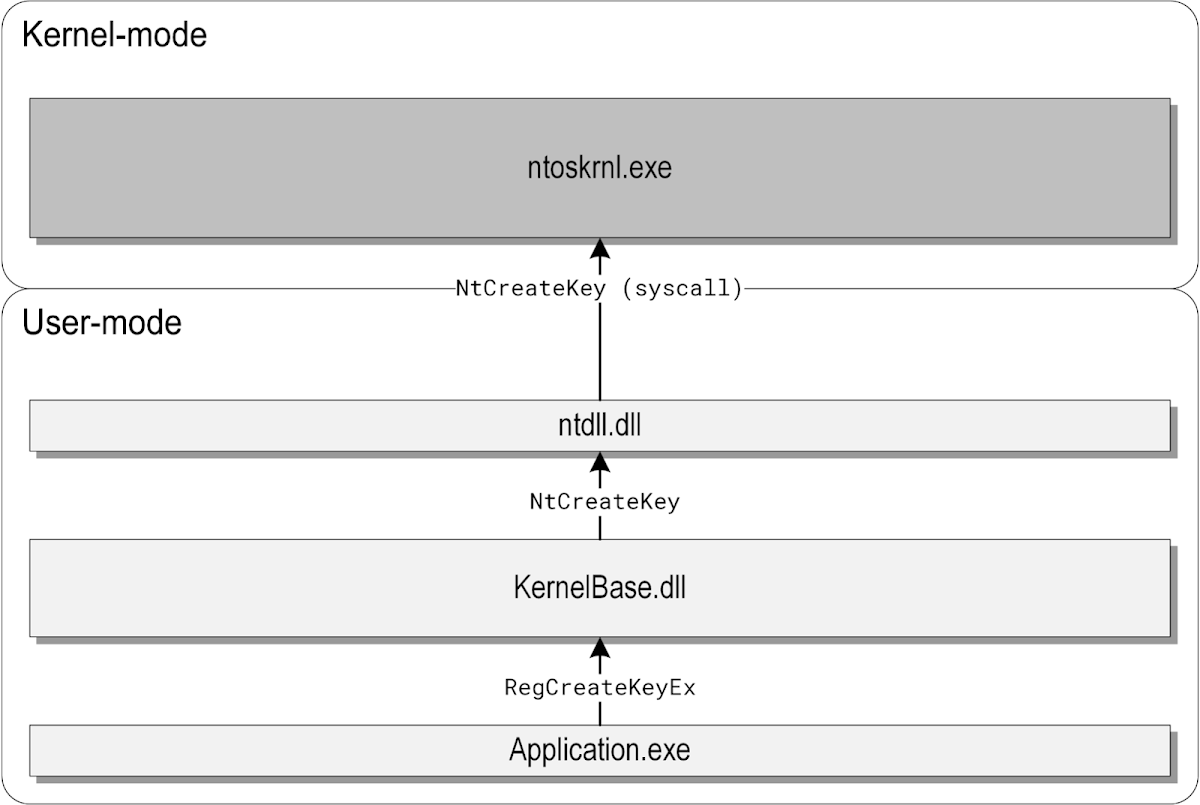
在这个例子中,Application.exe是一个调用文档化的RegCreateKeyEx函数的桌面程序,该函数由KernelBase.dll导出。KernelBase.dll库通过将调用者传递的高级API参数(路径、标志等)转换为内核理解的内部参数来实现RegCreateKeyEx。然后它通过ntdll.dll提供的薄包装调用NtCreateKey系统调用,执行最终到达Windows内核,在那里对内部注册表表示执行所有实际工作。
RegCreateKeyEx函数的声明如下:
LSTATUS RegCreateKeyExW(
[in] HKEY hKey,
[in] LPCWSTR lpSubKey,
DWORD Reserved,
[in, optional] LPWSTR lpClass,
[in] DWORD dwOptions,
[in] REGSAM samDesired,
[in, optional] const LPSECURITY_ATTRIBUTES lpSecurityAttributes,
[out] PHKEY phkResult,
[out, optional] LPDWORD lpdwDisposition
);
正如前两个参数所暗示的,许多注册表操作(尤其是键的打开/创建)都是在一对基础键句柄和相对键路径上执行的。HKEY是注册表键句柄的专用类型,但在功能上等同于标准的HANDLE类型。它可以包含键对象的常规句柄(由NT对象管理器管理),也可以是预定义键列表中描述的几种可能的伪句柄之一。它们在winreg.h中定义,具有以下数值:
#define HKEY_CLASSES_ROOT (( HKEY )(ULONG_PTR)((LONG)0x80000000) )
#define HKEY_CURRENT_USER (( HKEY )(ULONG_PTR)((LONG)0x80000001) )
#define HKEY_LOCAL_MACHINE (( HKEY )(ULONG_PTR)((LONG)0x80000002) )
#define HKEY_USERS (( HKEY )(ULONG_PTR)((LONG)0x80000003) )
#define HKEY_PERFORMANCE_DATA (( HKEY )(ULONG_PTR)((LONG)0x80000004) )
#define HKEY_PERFORMANCE_TEXT (( HKEY )(ULONG_PTR)((LONG)0x80000050) )
#define HKEY_PERFORMANCE_NLSTEXT (( HKEY )(ULONG_PTR)((LONG)0x80000060) )
#define HKEY_CURRENT_CONFIG (( HKEY )(ULONG_PTR)((LONG)0x80000005) )
#define HKEY_DYN_DATA (( HKEY )(ULONG_PTR)((LONG)0x80000006) )
#define HKEY_CURRENT_USER_LOCAL_SETTINGS (( HKEY )(ULONG_PTR)((LONG)0x80000007) )
正如我们所看到的,它们都设置了最高位,这通常是为内核模式句柄保留的。因此,这些值永远不会与合法的用户模式句柄冲突,并且可以自由地用作特殊的伪句柄。注册表API的责任是在调用内核之前将这些值转换为相应的低级注册表路径。换句话说,预定义键是严格意义上的用户模式概念,内核本身并不知道它们。如果有人决定通过系统调用而不是API直接编写与注册表交互的程序,他们将完全无法使用HKEY_*常量。
这解释了为什么顶级键不一定代表互斥的子树——它们本身都不代表注册表的任何特定部分,它们的意义纯粹是约定俗成的。由KernelBase.dll决定如何处理这些键中的每一个,RegOverridePredefKey函数的存在进一步强调了这一点,该函数允许应用程序在本地进程的上下文中重新映射它们。在文献中,根键有时被描述为特定注册表路径的“链接”,虽然这在概念上是正确的,但可能会让知道符号链接存在的读者感到困惑,符号链接是一种独立的、无关的机制。事实上,如果我们计算访问注册表键可以透明地重定向到另一个路径的所有不同方式(无论是在接口的用户部分还是内核部分),我们最终会得到至少四种:
- 用户模式注册表API解释顶级键并将其转换为特定的内部路径,如上所述。
- 内核模式配置管理器遵循注册表中的符号链接,即使用REG_OPTION_CREATE_LINK标志创建并具有名为"SymbolicLinkValue"、类型为REG_LINK的值的键。
- 内核模式配置管理器对特定的旧版应用程序应用注册表虚拟化,从而将HKEY_LOCAL_MACHINE\Software的子键的读/写重定向到HKEY_USERS<SID>_Classes\VirtualStore\Machine\Software。
- 用户模式注册表API和内核模式配置管理器共同处理所谓的“预定义句柄键”(由CM_KEY_NODE.Flags中的标志0x40标记)。这是一种特殊的、未文档化的键类型,其工作方式类似于符号链接,但它们不是重定向到任意注册表路径,而是重定向到特定的32位预定义句柄(即HKEY_*键之一)。历史上,它们是许多安全漏洞的来源,最终在2023年7月/12月被弃用,以解决Project Zero问题#2445 + #2452(CVE-2023-35356)和#2492(CVE-2023-35633)。
这表明了Windows中维护的遗留/兼容性机制的程度,以及注册表代码的用户模式和内核部分之间的协作程度。但回到顶级键的主题,值得对它们在系统中的角色有一个大致的了解。许多现有资源很好地解释了这一点(请参阅我的上一篇文章以获取参考资料),因此我将在下面只提供一个非常简要的概述。总的来说,最重要的收获是HKEY_LOCAL_MACHINE和HKEY_USERS是两个完整的键,可用于访问全局可见注册表视图中的几乎所有数据。其他HKEY_*键是这两个键的派生(HKEY_PERFORMANCE_*除外,它们甚至不是真正的键),并且主要是为了方便而存在。
| 顶级键 | 内部注册表路径 | 描述 |
|---|---|---|
| HKEY_CLASSES_ROOT | 合并视图: - \Registry\Machine\Software\Classes - \Registry\User<SID>_Classes |
该键包含文件名扩展关联和COM类注册信息。两个键的合并是在KernelBase.dll中执行的,请参阅OpenClassesRootInternal、BaseRegQueryAndMergeValues及其他相邻函数,以及HKEY_CLASSES_ROOT键和HKEY_CLASSES_ROOT的合并视图官方文章。 |
| HKEY_CURRENT_USER | \Registry\User<SID> | 存储与当前用户关联的配置。 |
| HKEY_LOCAL_MACHINE | \Registry\Machine | 存储全局的、系统范围的配置。 |
| HKEY_USERS | \Registry\User | 存储系统中当前登录的所有用户的信息。 |
| HKEY_PERFORMANCE_DATA | - | 不是真正的键:一个允许应用程序通过注册表API查询性能信息的伪键。 |
| HKEY_PERFORMANCE_TEXT | - | 不是真正的键:可用于通过注册表API查询性能信息,描述为美式英语。 |
| HKEY_PERFORMANCE_NLSTEXT | - | 不是真正的键:可用于通过注册表API查询性能信息,描述为本地系统语言。 |
| HKEY_CURRENT_CONFIG | \Registry\Machine\System\CurrentControlSet\Hardware Profiles\Current | 存储有关当前硬件配置文件的信息。 |
| HKEY_DYN_DATA | - | HKEY_PERFORMANCE_DATA的已弃用等效项,仅存在于Windows 9x中。它被设计为动态生成信息(如性能计数器或硬件配置)的通用存储。 |
| HKEY_CURRENT_USER_LOCAL_SETTINGS | \Registry\User<SID>_Classes\Local Settings | 存储与当前用户关联的配置,这些配置是本地于机器的,不受漫游配置文件的影响。 |
在安全性方面,顶级键及其子树通常按照常识进行保护。HKEY_LOCAL_MACHINE的几乎所有子键(即全局系统设置)只能由管理员和系统本身写入。一些子树对普通用户可读(例如HKLM\Software或HKLM\System),而其他子树则不允许受限帐户进行任何访问(例如存储用户凭据的HKLM\SAM)。此外,普通用户对其自己的用户hive(HKU<SID>和HKU<SID>_Classes)具有完全访问权限,而对其他用户的hive没有访问权限,而管理员对HKU下的所有用户hive具有不受限制的访问权限。
总而言之,这是为了确保每个用户都有自己的本地hive来存储数据,并且可以读取非敏感的系统配置,而管理员对注册表中的所有内容拥有完全控制权,以便他们能够有效地管理系统。在对注册表的高级结构有了基本了解之后,让我们进一步了解其底层工作原理。
底层视角
如果Windows内核不以与用户模式API相同的方式使用预定义键,那么问题就变成了——注册表树从哪里开始?你可能已经根据本文和之前的博客文章猜到了答案:它是全局NT对象命名空间中的\Registry对象。在内部,它是一个虚拟“主”hive中的易失性键(由nt!CmpMasterHive指向),该键和hive仅存在于内存中,用于组织目的。它们的设置在启动过程的早期在内部CmInitSystem1函数中进行,并且\Registry对象可以在探索对象管理器命名空间的工具中看到,例如WinObj:
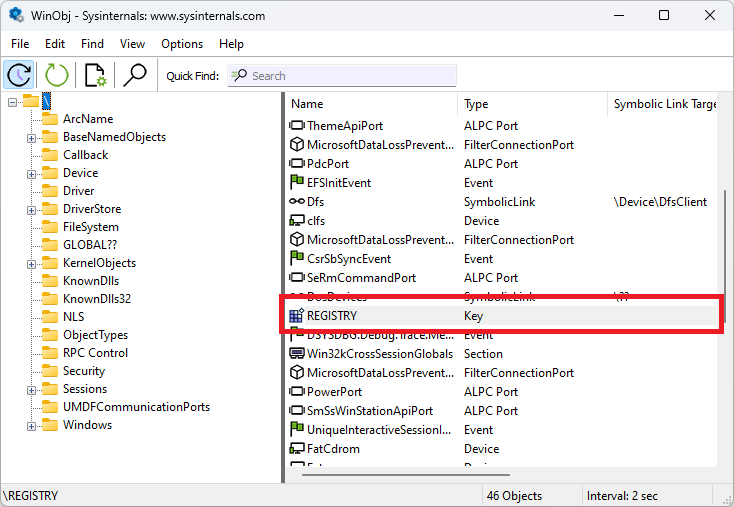
这本质上是访问系统中任何注册表键的入口点。每当对象管理器处理以\Registry开头的路径上的操作时,它知道将执行传递给CmpParseKey函数,该函数接管操作,解析路径的其余部分,尝试打开或创建给定的键,并将对象返回给调用者。由于\Registry在大多数情况下是一个普通键,我们可以在WinDbg中查询它:
kd> !reg querykey \Registry
Found KCB = ffff8f818bad92f0 :: \REGISTRY
Hive ffff8f818ba88000
KeyNode ffff8f818bada024
[SubKeyAddr] [SubKeyName]
ffff8f818bada244 A
ffff8f818bada16c MACHINE
ffff8f818bada1d4 USER
ffff8f818bada2c4 WC
Use '!reg keyinfo ffff8f818ba88000
[ValueType] [ValueName] [ValueData]
Key has no Values
如输出所示,根键有四个子键:A、MACHINE、USER和WC。其中两个我们已经知道:“Machine”对应HKEY_LOCAL_MACHINE,“User”对应HKEY_USERS。此外,“A”作为所有作为应用程序hive加载的私有hive的根(使用RegLoadAppKey API)。无论其安全描述符或调用者的权限如何,都无法通过其完全限定路径(\Registry\A...)打开该键及其任何子键,因为CmpParseKey检测并拒绝此类请求,并返回STATUS_ACCESS_DENIED错误代码。这是为了保证所有应用程序hive保持私有,并且只能通过RegLoadAppKey返回的句柄访问。最后,“WC”可能代表“Windows Containers”,并且是作为Windows容器化支持(在Windows 10 1607中引入)一部分加载的差异hive的挂载点。该键是全球可读的,不受任何特殊保护,但它也没有映射到任何预定义键,因此只能通过系统调用访问,而不能通过官方API访问(符号链接除外)。
注册表的底层视图以及高级预定义键如何映射到它的示意图如下所示:
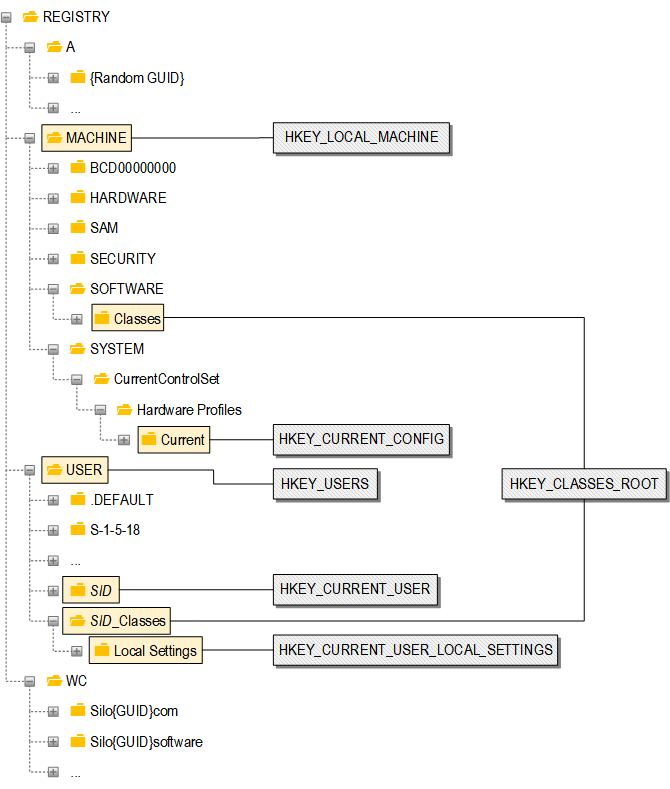
显然,内部注册表布局比其高级对应物更加结构化,并遵循一些基本规则:
- 树的第一级和第二级是预定的,并且始终相同。
- 第三级仅由系统中加载的活动hive的根键组成。
- 第四级及更高级别是hive的嵌套子键。
在典型的Windows安装中,系统中通常在任何给定时间加载数十个hive,存储各种配置数据。在本文和之前的博客文章中已经广泛使用了“hive”这个术语,让我们更详细地讨论它们是什么以及它们如何工作。
Hive文件
描述注册表hive的最佳方式莫过于引用Microsoft文章(注册表Hive)中的官方定义:
hive是注册表中键、子键和值的逻辑组,当操作系统启动或用户登录时,其支持文件集被加载到内存中。
换句话说,hive是以regf格式编码的独立数据库,在操作系统中服务于特定目的(如果你对名称的起源感到好奇,请查看为什么注册表文件被称为“hive”?)。hive可以根据其所在位置(磁盘上、内存中或两者)进行分类:
- 文件支持的
- 未加载的:持久存储在磁盘上但未在系统中主动加载的hive。
- 已加载的:既存储在磁盘上又被Windows当前使用的hive。数据库的内存中和磁盘上表示由内核持续同步,以确保在突然断电或其他系统故障时的一致性。
- 易失性的:不存储在磁盘上且仅存在于内存中直到下次系统重启的临时hive。示例包括主hive(对应\Registry全局根)和挂载在\Registry\Machine\HARDWARE的硬件hive。从安全角度来看,它们并不特别重要,但为了完整性,值得注意它们的存在。
大多数hive是文件支持的,因为它们的目的正是为了在长时间和多次重启中存储数据。有趣的是,当我们在磁盘上观察hive时(这可能需要检查“显示隐藏的文件、文件夹和驱动器”选项,并在资源管理器中取消选中“隐藏受保护的操作系统文件”),它通常不是单个文件,而是具有公共名称前缀的文件集合。例如,让我们看看Windows 11中用户主目录中的NTUSER hive:
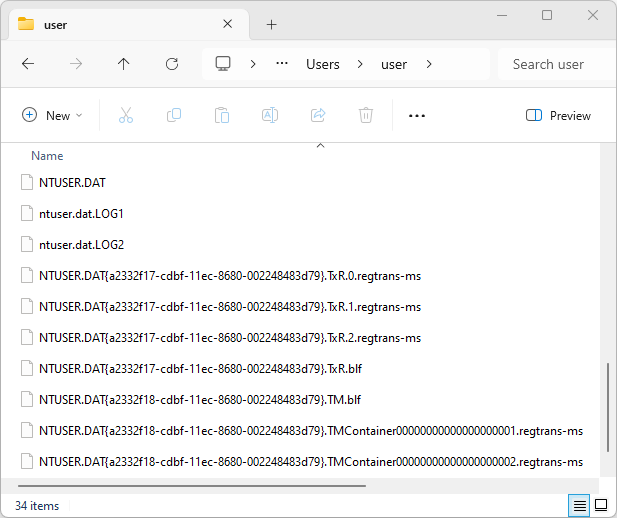
所有这些文件都与单个hive相关。让我们简要浏览一下屏幕截图中可见的每种文件类型:
- .DAT——这是核心hive文件,也是唯一严格必需的文件。.dat扩展名在hive文件上下文中经常出现(其他不太常见的变体:.hiv和.hve),但这只是习惯性的,内核将乐意从任何文件加载hive,无论其名称如何(例如,C:\Windows\system32\config中的系统hive文件都没有任何扩展名)。当hive处于活动状态时,内核会锁定该文件,防止任何其他程序同时对其进行操作。
- .LOG1和.LOG2——由配置管理器维护的日志文件,用于保障hive的低级可恢复性。当它们被使用时,对hive的每个写操作首先写入日志文件,然后刷新到hive文件本身。有关日志记录机制的更深入分析,请参阅Windows Internals书中的注册表章节(特别是“稳定存储”和“增量日志记录”部分)。尽管在大多数实际场景中,hive文件通常伴随有.LOG1/.LOG2文件,但也可以有单个.LOG文件(通过使用REG_HIVE_SINGLE_LOG标志加载hive),或者通过使用REG_OPEN_READ_ONLY或REG_IMMUTABLE标志完全阻止内核创建它们。
- .regtrans-ms和.blf——与内核事务管理器和事务注册表相关的附加日志文件。它们存储有关使用RegCreateKeyTransacted或RegOpenKeyTransacted API函数打开的事务键上执行的待处理操作的信息,并用于在突然系统重启时向前滚动这些操作。它们应配置管理器的请求创建,但由通用日志文件系统驱动程序内部管理。它们为系统hive启用(HKLM下的所有hive将其事务日志共同保存在C:\Windows\system32\config\TxR中),并为用户特定的hive(NTUSER.DAT和UsrClasses.dat)启用,但对于应用程序hive(\Registry\A...)和差异hive(\Registry\WC...)始终禁用。也可以通过使用REG_HIVE_NO_RM标志强制加载禁用事务的hive。
总之,单个hive可能与磁盘上的最多10个文件相关联。我不会深入讨论它们的二进制格式细节,因为这将在未来的文章中讨论,但有趣的是,每种文件类型在过去都受到过一些安全问题的影响(请参阅[.DAT](https://project-zero.issues.chromium.org/issues?q=id:(42450251%20%7C%2042452400%20%7C%2042451423%20%7C%2042451425%20%7C%2042451427%20%7C%2042451449%20%7C%2042451463%20%7C%2042451465%20%7C%2042451478%20%7C%2042451494%20%7C%2042451502%20%7C%2042451588%20%7C%2042451596%20%7C%2042451601%20%7C%2042451640)、[.LOG1/.LOG2](https://project-zero.issues.chromium.org/issues?q=id:(42452405%20%7C%2042450541%20%7C%2042450609%20%7C%2042451598%20%7C%2042451600)和[.regtrans-ms/.blf](https://project-zero.issues.chromium.org/issues?q=id:(42450872%20%7C%2042451149%20%7C%2042451150%20%7C%2042451559%20%7C%2042451560)的示例)。现在让我们回顾一下Windows中通常加载的一些默认hive,以及我们如何枚举和检查它们。
Hive列表和内存映射
在内部,Windows内核维护系统中活动hive的链表,从全局nt!CmpHiveListHead对象开始。但有趣的是,该信息也通过注册表本身全局可见:在\Registry\Machine\System\CurrentControlSet\Control\hivelist处有一个特殊键,内核在其中为每个加载的hive维护一个字符串值,其名称指示注册表挂载点,其数据指定磁盘上的低级路径。系统中除应用程序hive外的所有活动文件支持hive都列在那里,检查该列表就像在Regedit中找到“hivelist”键一样简单:
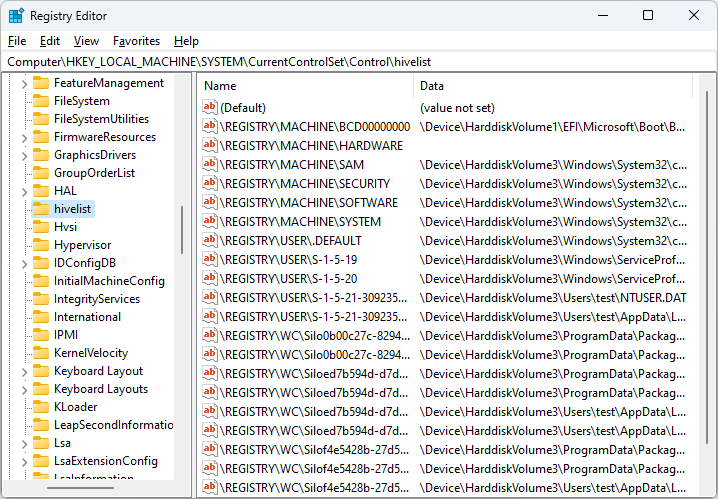
在这里,我们可以看到挂载在\Registry\Machine下的标准系统hive、\Registry\User下的几个用户hive(其中一些用于系统帐户,一些用于当前用户),以及\Registry\WC处的许多差异hive。可以使用WinDbg中的!reg hivelist命令获得类似但更详细的hive列表:
kd> !reg hivelist
| HiveAddr |Stable Length| Stable Map |Volatile Length| Volatile Map |MappedViews | FileName
| ffff8f818ba88000 | 2000 | ffff8f818ba88128 | 1000 | ffff8f818ba883a0 | ffff8f818bad5000 |
| ffff8f818ba62000 | d8c000 | ffff8f818badc000 | 41000 | ffff8f818ba623a0 | ffff8f818badb000 | SYSTEM
| ffff8f818bb87000 | 24000 | ffff8f818bb87128 | 10000 | ffff8f818bb873a0 | ffff8f818bb5a000 |
| ffff8f818c813000 | 4c4b000 | ffff8f818e482000 | 330000 | ffff8f8190b98000 | ffff8f818e470000 | emRoot\System32\Config\SOFTWARE
| ffff8f818e578000 | 8000 | ffff8f818e578128 | 0 | 0000000000000000 | ffff8f818e4f9000 | kVolume1\EFI\Microsoft\Boot\BCD
| ffff8f818c75b000 | 74000 | ffff8f818c75b128 | 1000 | ffff8f818c75b3a0 | ffff8f818e5d4000 | temRoot\System32\Config\DEFAULT
| ffff8f818e773000 | 9000 | ffff8f818e773128 | 1000 | ffff8f818e7733a0 | ffff8f818e9be000 | emRoot\System32\Config\SECURITY
| ffff8f818e9a8000 | d000 | ffff8f818e9a8128 | 0 | 0000000000000000 | ffff8f818ea2c000 | \SystemRoot\System32\Config\SAM
| ffff8f818ec68000 | 2f000 | ffff8f818ec68128 | 1000 | ffff8f818ec683a0 | ffff8f818ea54000 | files\NetworkService\NTUSER.DAT
| ffff8f818ee2e000 | 30000 | ffff8f818ee2e128 | 0 | 0000000000000000 | ffff8f818edf9000 | rofiles\LocalService\NTUSER.DAT
| ffff8f818ee63000 | 72000 | ffff8f818ee63128 | 0 | 0000000000000000 | ffff8f818ee48000 | \SystemRoot\System32\Config\BBI
| ffff8f8190370000 | 19b000 | ffff8f8190370128 | 4000 | ffff8f81903703a0 | ffff8f81903e7000 | ??\C:\Users\user\ntuser.dat
| ffff8f8190373000 | 2cf000 | ffff8f81903fb000 | 0 | 0000000000000000 | ffff8f81903eb000 | \Microsoft\Windows\UsrClass.dat
| ffff8f8191a2e000 | 7000 | ffff8f8191a2e128 | 0 | 0000000000000000 | ffff8f8191a8c000 | 5n1h2txyewy\ActivationStore.dat
| ffff8f8191a30000 | 1c000 | ffff8f8191a30128 | 0 | 0000000000000000 | ffff8f8191a93000 | 5n1h2txyewy\ActivationStore.dat
| ffff8f8191a32000 | 78000 | ffff8f8191a32128 | 0 | 0000000000000000 | ffff8f8191a9a000 | 5n1h2txyewy\ActivationStore.dat
| ffff8f8191bf7000 | 1f3000 | ffff8f8191bf7128 | 0 | 0000000000000000 | ffff8f8191bfb000 | \AppCompat\Programs\Amcache.hve[...]
此输出缺少注册表路径,但为我们提供了文件名,并且还包含相应HHIVE/CMHIVE结构的地址以及每个hive的稳定/易失性空间信息。它还显示系统中的所有活动hive,包括应用程序hive和易失性hive。例如,列表中的第一项和第三项分别是\Registry和\Registry\Machine\HARDWARE hive——由于它们都不是文件支持的,它们的FileName列显示“
枚举系统中hive的最终方法是列出节对象。在现代版本的Windows中,大多数注册表hive使用节映射到一个名为Registry的特殊、轻量级进程的用户地址空间(你可以在任务管理器中找到它)。两个显著的例外是SYSTEM hive和任何在加载时不存在于磁盘上的hive(即使用NtLoadKey*调用从头创建的hive)。但对于所有其他hive,我们可以通过在WinDbg中找到Registry进程,切换到其上下文,并发出!vad命令来显示其关联的虚拟地址描述符(VAD)来打印它们:
kd> !process 0 0
**** NT ACTIVE PROCESS DUMP ****
PROCESS ffffb3047dcf4040
SessionId: none Cid: 0004 Peb: 00000000 ParentCid: 0000
DirBase: 001ae002 ObjectTable: ffff8f818ba85f00 HandleCount: 3193.
Image: System
PROCESS ffffb3047ddc0080
SessionId: none Cid: 0040 Peb: 00000000 ParentCid: 0004
DirBase: 02db7002 ObjectTable: ffff8f818ba02c00 HandleCount: 0.
Image: Registry[...]
kd> .process ffffb3047ddc0080
Implicit process is now ffffb3047ddc0080
警告:.cache forcedecodeuser未启用
kd> !vad
VAD Level Start End Commit
ffffb3047e3653e0 6 28700000 287001ff 0 Mapped READONLY \Windows\System32\config\SOFTWARE
ffffb3047e364a80 5 28700200 287003ff 0 Mapped READONLY \Windows\System32\config\SOFTWARE
ffffb3047e365020 6 28700400 287005ff 0 Mapped READONLY \Windows\System32\config\SOFTWARE
ffffb3047e364760 4 28700600 287007ff 0 Mapped READONLY \Windows\System32\config\SOFTWARE
ffffb3047e364e40 6 28700800 287009ff 0 Mapped READONLY \Windows\System32\config\SOFTWARE
ffffb3047e364d00 5 28700a00 28700bff 0 Mapped READONLY \Windows\System32\config\SOFTWARE
ffffb3047e3646c0 6 28700c00 28700dff 2 Mapped READONLY \Windows\System32\config\SOFTWARE
ffffb3047e364800 3 28700e00 28700fff 2 Mapped READONLY \Windows\System32\config\SOFTWARE
ffffb3047e3648a0 6 28701000 287011ff 0 Mapped READONLY \Windows\System32\config\SOFTWARE
ffffb3047e365160 5 28701200 287013ff 0 Mapped READONLY \Windows\System32\config\SOFTWARE
ffffb3048058e450 6 28701400 2870147f 114 Mapped READONLY \Windows\System32\config\BBI
ffffb30480f68890 4 28701480 2870167f 19 Mapped READONLY \Users\user\NTUSER.DAT
ffffb30480f690b0 5 28701680 2870187f 5 Mapped READONLY \Users\user\AppData\Local\Microsoft\Windows\UsrClass.dat
ffffb30480f69e70 2 28701880 2870197f 2 Mapped READONLY \Users\user\AppData\Local\Microsoft\Windows\UsrClass.dat
[...]
ffffb3047e364580 6 2877fca0 2877fe9f 0 Mapped READONLY \Windows\System32\config\SOFTWARE
ffffb3047e364c60 5 2877fea0 2877feaf 8 Mapped READONLY \EFI\Microsoft\Boot\BCD
ffffb3047e366b00 6 2877feb0 2877ff2f 19 Mapped READONLY \Windows\System32\config\DEFAULT
ffffb3047e372ae0 3 2877ff30 2877ff3f 0 Mapped READONLY \Windows\System32\config\SECURITY
ffffb3047e3745c0 5 2877ff40 2877ff4f 0 Mapped READONLY \Windows\System32\config\SAM
[...]
There may be multiple VADs associated with a single hive, because hives are mapped in a fragmented manner and may dynamically grow over time. The address ranges specified by the "Start" and "End" columns correspond to the "pcell" addresses returned by the !reg cellindex WinDbg command when multiplied by 0x1000 (the page size). For example, the BCD hive is mapped between 0x2877fea0000 and 0x2877feaffff. The first page (the 4 KiB hive header) is typically not mapped, but we can see the raw data of the first bin residing at address 0x2877fea1000:
kd> db 0x2877fea1000
000002877fea1000 68 62 69 6e 00 00 00 00-00 10 00 00 00 00 00 00 hbin............
000002877fea1010 00 00 00 00 a5 7a 66 c9-8b 03 da 01 00 00 00 00 .....zf.........
000002877fea1020 a0 ff ff ff 6e 6b 2c 00-c1 e4 70 f6 e3 8b da 01 ....nk,...p.....
000002877fea1030 03 00 00 00 48 04 00 00-02 00 00 00 00 00 00 00 ....H...........
000002877fea1040 48 02 00 00 ff ff ff ff-00 00 00 00 ff ff ff ff H...............
000002877fea1050 68 01 00 00 ff ff ff ff-16 00 00 00 00 00 00 00 h...............
000002877fea1060 00 00 00 00 00 00 00 00-00 00 00 00 0c 00 00 00 ................
000002877fea1070 4e 65 77 53 74 6f 72 65-52 6f 6f 74 00 00 00 00 NewStoreRoot....
Default system hives
Knowing the basic structure of the registry tree and how we can enumerate hives, let's now briefly discuss the role and properties of the default hives that we'll find in a clean installation of Windows:
Registry path
Description
\Registry\A{RANDOM GUID}
Application hives may contain any information the client program decides to save, but two of its primary uses are by Universal Windows Platform (UWP) applications to store information about their WinRT classes (in a file called ActivationStore.dat) and their private settings (backed by settings.dat). The lifespan of app hives is tied to their active references, so whenever all handles to the hive are closed (or the process terminates), the hive is automatically unloaded. The security rights set on the keys in app hives are generally irrelevant, because they cannot be opened by any process that doesn't have a valid handle to the hive to start with, thanks to the extra checks hardcoded in CmpParseKey.
\Registry\Machine\BCD00000000
The hive contains the Boot Configuration Database (BCD) that replaced the boot.ini file in Windows Vista. It is backed by a hidden \EFI\Microsoft\Boot\BCD file, and can be modified indirectly with the bcdedit command line utility. Full access is granted to administrators, and no access is granted to normal users.
\Registry\Machine\HARDWARE
The hive contains a specification of the system's legacy hardware (such as a keyboard or mouse). As previously mentioned, it is a volatile hive without a backing file, which is dynamically generated during boot in the internal CmpInitializeHardwareConfiguration function. It grants full access to administrators and read access to normal users.
\Registry\Machine\SAM
The hive contains information managed by the Security Account Manager (SAM), such as user passwords and group definitions. It is backed by the C:\Windows\system32\config\SAM file, and it is the only hive with lazy flushing disabled, meaning that it must be manually synchronized with the backing file by the SAM Server using syscalls like NtFlushKey and NtRestoreKey. It grants full access to the LocalSystem account and no access to any of the users, so even administrators cannot modify or browse it by default.
\Registry\Machine\SECURITY
The hive contains security-critical information such as security policies and user right assignments. It is backed by C:\Windows\system32\config\SECURITY, and similarly to SAM, it only grants access to the LocalSystem account.
\Registry\Machine\SOFTWARE
The hive is a general-purpose store for system-wide configuration of both Windows built-in components and third-party software. It is generally the only hive in HKLM where legitimate programs ever need to write to, and for this reason it is the only one subject to registry virtualization. It is backed by the C:\Windows\system32\config\SOFTWARE file, and a majority of its keys are user-readable and admin-writable. However, there are some exceptions to this rule: firstly, there are several default keys with more permissive rights (e.g. user-writable) and some default keys with more restrictive rights (e.g. only readable by specific users and not broadly accessible). Secondly, the responsibility to set adequate security of the keys is shared by all applications using the hive, but in practice, their behavior isn't always consistent with Windows (i.e. they may set more or less permissive rights than we would normally expect).
\Registry\Machine\SYSTEM
The hive is a store for system-wide configuration that is required to boot the system, such as information about device drivers and system services. It is backed by the C:\Windows\system32\config\SYSTEM file and it is first loaded in memory before the Windows kernel itself, by a copy of the Configuration Manager found in the winload.exe/winload.efi executables. It is also the only system hive mapped in kernel paged pool and not in the user-space of the special Registry process. Similarly to SOFTWARE, most of its keys are user-readable and admin-writable, but there are some notable exceptions to this rule.
\Registry\User<SID>
The user hives are meant to store user-specific configuration; when a new user is created, the user hive starts off with a basic structure and grows larger as applications save their settings over time. They are typically backed by the NTUSER.DAT file in the user directory, but can also be overridden by NTUSER.MAN by taking advantage of the Mandatory User Profiles. Their security is arranged such that they are accessible by the associated user and administrators, but not other users in the system.
A special case of user hives are the hives corresponding to system-specific accounts which are mounted and globally visible under \Registry\User:
- \Registry\User.DEFAULT – the user hive of the LocalSystem account, backed by C:\Windows\system32\config\DEFAULT. If you think this is a confusing name, I agree, and so does Raymond Chen in his The .Default user is not the default user blog post.
- \Registry\User\S-1-5-18 – this is the SID of the LocalSystem account, so the key is simply a symbolic link to \Registry\User.DEFAULT.
- \Registry\User\S-1-5-19 – the user hive of the LocalService account, backed by C:\Windows\ServiceProfiles\LocalService\NTUSER.DAT.
- \Registry\User\S-1-5-20 – the user hive of the NetworkService account, backed by C:\Windows\ServiceProfiles\NetworkService\NTUSER.DAT.
\Registry\User<SID>_Classes
The "classes" hive is the second one that gets automatically loaded once a user logs into the system. It is responsible for storing the user-specific file extension associations and COM class registrations, which are then merged with \Registry\Machine\Software\Classes by the Registry API and exposed as the HKEY_CLASSES_ROOT top-level key. It is additionally used by the registry virtualization mechanism, and is pointed to by the \Registry\User<SID>\Software\Classes symbolic link. The hive is backed by C:\Users<USER>\AppData\Local\Microsoft\Windows\UsrClass.dat, and has the same security properties as the regular user hive: it is only accessible by the owner user and administrators.
\Registry\WC\Silo{...}
Differencing hives are a new technology introduced in Windows 10 Anniversary Update to support registry containerization in various Windows technologies such as Helium containers (application silos, used e.g. by MSIX packaged apps) or Argon containers (server silos, used e.g. by Docker). They are managed by the AppInfo service through VRegDriver – a special module built into ntoskrnl.exe that is tightly integrated with the Configuration Manager and exposes an IOCTL interface to operate on delta hives. Many default Windows components and programs (e.g. the Widgets app, Paint, Notepad) run in the context of app silos, so there are typically a number of hives mounted under \Registry\WC at any given time. Other than that, there isn't much that can be said about them as a whole, as their backing files and security settings can vary greatly depending on multiple factors. These special hives will be discussed in more detail in future blog posts.
There are a few other system hives that can be found in C:\Windows\system32\config\ on modern versions of Windows that aren't discussed above:
- BBI – likely Background Broker Infrastructure, loaded during boot as an app hive by the Background Tasks Infrastructure Service (bisrv.dll).
- COMPONENTS – contains information associated with Windows Update and the Component Based Servicing (CBS) stack. It isn't always active, but instead, it is loaded and unloaded on demand whenever a component installation or update takes place.
- DRIVERS – driver information store, loaded by the kernel on demand at \Registry\Machine\DRIVERS.
- ELAM – Early Launch Anti-Malware, briefly loaded during boot at \Registry\Machine\ELAM.
Note that these hives exist, but they aren't particularly interesting in the context of this research. Now, equipped with the knowledge of how the default Windows hives function, let's see what operations can be performed on them as whole objects.
Hive operations
The Windows kernel provides several system calls for operating on registry hives, which are summarized in the following table:
Syscall name(s)
Description
NtCompressKey
Compresses the specific hive in-place by defragmenting allocated cells.
NtLoadKey*
Loads an existing hive or creates a new one, and mounts it in the global tree view. Documented counterparts: RegLoadKey and RegLoadAppKey. The interface is internally used by the 'File > Load Hive...' option in Regedit.
NtReplaceKey
Replaces the backing file of a specific active hive with another file on the next system boot. Documented counterpart: RegReplaceKey.
NtRestoreKey
Copies data from a hive file to the global registry tree. This operation is similar to loading, but doesn't maintain any synchronization between the in-memory and on-disk representations after the hive is loaded (restored). Documented counterpart: RegRestoreKey. This interface is internally used by the 'File > Import...' option in Regedit.
NtSaveKey*, NtSaveMergedKeys
Saves the specific subtree to a file on disk in the regf format. Documented counterparts: RegSaveKey and RegSaveKeyEx. This interface is internally used by the 'File > Export...' option in Regedit. Interestingly, the sole purpose of NtSaveMergedKeys seems to be to provide a NtSaveKey-like functionality for HKEY_CLASSES_ROOT, which, as mentioned earlier, is a special merged view of \Registry\Machine\Software\Classes and \Registry\User<SID>_Classes implemented in user-mode.
NtUnloadKey*
Unloads a registry hive and unmounts it from the global view. Documented counterpart: RegUnLoadKey. This interface is internally used by the 'File > Unload Hive...' option in Regedit.
The above services provide some valuable insight into what actions can be performed on hives. A careful reader will notice that this list is longer than the table of basic hive operations shown in blog post #2, which is because all of these syscalls (other than NtLoadKey* with the REG_APP_HIVE flag) require administrative privileges (SeBackupPrivilege or SeRestorePrivilege) and are not a widely accessible attack surface. Furthermore, most of them see little to no use in a typical system run time. The only notable exception is NtRestoreKey, which is part of the "RXact" user-mode transaction mechanism used for operating on the SAM hive by the SAM Service, as mentioned in the Windows Kernel registry quota exhaustion may lead to permanent corruption of the SAM database report (CVE-2024-26181).
From a strictly security perspective, the most critical hive-related operation is their loading. Let's dive deeper into how it works.
Loading hives
There are currently three distinct ways in which registry hives are loaded in Windows:
- Internally by the kernel at boot time. This applies to most of the hives under \Registry\Machine, as well as \Registry\User.DEFAULT. There is also an optional hive named "OSDATA" that gets loaded under \Registry\Machine\OSDATA if it exists at C:\Windows\system32\config\OSDATA. It is unclear what its role is, and I was unable to find much information during a quick web search. It seems to be used by user-mode libraries whenever RtlIsStateSeparationEnabled returns TRUE, which implies it may be somehow related to State Separation.
- Using one of the NtLoadKey-family system calls, which may be invoked from the kernel, a privileged user-mode service, or a normal user application. In the latter two cases, the request usually comes through a corresponding Registry API function such as RegLoadKey or (more likely) RegLoadAppKey.
- Through the IOCTL interface of the VRegDriver, in order to load a differencing hive under \Registry\WC. This path is taken exclusively by system services responsible for the initialization of application and server silos, such as the AppInfo service.
The first option isn't particularly important because it happens seamlessly before we can influence the system in any way, and we are simply left with the outcome (but if you're curious to learn more, here are some good starting points: CmInitSystem1, CmpInitializeSystemHive, NtInitializeRegistry, CmpInitializeSystemHivesLoad, CmpFinishSystemHivesLoad). Furthermore, option #3 is related to container support and thus mostly outside of the scope of this post, but we will briefly cover it later. Right now, let's focus on the standard interfaces that Windows exposes for loading hives (option #2), as this is where the magic happens.
The primary Registry API function for loading hives is RegLoadKey, whose Unicode version has the following declaration:
LSTATUS RegLoadKeyW(
[in] HKEY hKey,
[in, optional] LPCWSTR lpSubKey,
[in] LPCWSTR lpFile
);
It's quite clear that the function offers limited customization options, as it only takes a handle to the root key, the name of the subkey that will become the mount point, and the path of the hive file to load. In Windows Vista, a second API function called RegLoadAppKey was introduced, designed specifically to allow the caller to load application hives:
LSTATUS RegLoadAppKeyW(
[in] LPCWSTR lpFile,
[out] PHKEY phkResult,
[in] REGSAM samDesired,
[in] DWORD dwOptions,
DWORD Reserved
);
In this case, we lose the ability to specify the path of the hive mount point, which is irrelevant because app hives cannot be accessed through fully-qualified paths anyway. On the other hand, we gain some customizability as we can pass the REG_PROCESS_APPKEY flag via dwOptions, and there is also a Reserved parameter that may be used to further extend the functionality in the future.
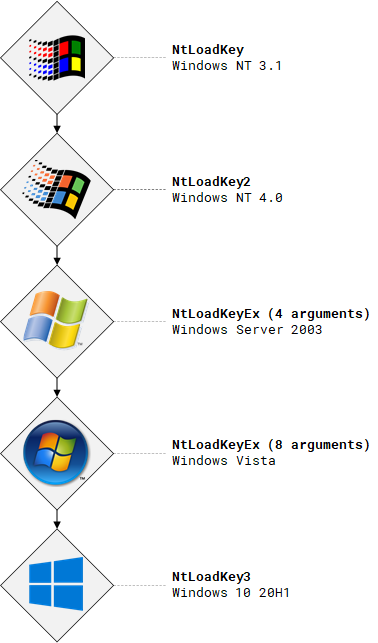
Both of these documented functions internally rely on NtLoadKey-family system calls, such as NtLoadKey, NtLoadKey2, NtLoadKeyEx or NtLoadKey3 (admittedly quite an unconventional progression). New iterations have been historically added in subsequent versions of Windows to extend the functionality of the previous syscalls. In the case of NtLoadKeyEx, the definition of this singular system call even changed between Windows Server 2003 and Windows Vista to accommodate new options, which is unusual, as syscall definitions tend to be stable. These developments are illustrated in the image below:
Let's have a closer look at the prototype of NtLoadKeyEx, whose arguments most clearly reflect the evolution of the interface. While the latest NtLoadKey3 function introduced further advancements by making it possible to specify additional impersonation tokens, its definition references an undocumented structure and is thus less suitable as an example. If you're curious to learn more about this newest syscall, see James's Silent Exploit Mitigations for the 1% blog post. Meanwhile, NtLoadKeyEx is defined as follows:
NTSTATUS NtLoadKeyEx(
POBJECT_ATTRIBUTES TargetKey, // 自NtLoadKey起(Windows NT 3.1)
POBJECT_ATTRIBUTES SourceFile, // 自NtLoadKey起(Windows NT 3.1)
ULONG Flags, // 自NtLoadKey2起(Windows NT 4.0)
HANDLE TrustClassKey, // 自NtLoadKeyEx起(Windows Server 2003)
HANDLE Event, // 自NtLoadKeyEx起(Windows Vista)
DWORD DesiredAccess, // 自NtLoadKeyEx起(Windows Vista)
PHANDLE RootHandle, // 自NtLoadKeyEx起(Windows Vista)
PIO_STATUS_BLOCK IoStatus // 自NtLoadKeyEx起(Windows Vista)
);
Here's an overview of the semantics of the parameters:
- TargetKey – specifies the new mount point of the hive, e.g. \Registry\User<SID>. Corresponds to the combination of hKey/lpSubKey arguments in RegLoadKey.
- SourceFile – specifies the path of the hive on a file system in the internal NT format, e.g. ??\C:\Users<USER>\NTUSER.DAT. Directly corresponds to the lpFile argument in RegLoadKey.
- Flags – specifies a set of options for loading the hive.
- TrustClassKey – specifies an existing hive within the same "trust class" as the loading hive. Trust classes, introduced in Windows Server 2003, define strict rules for which hives can link to each other, preventing symbolic link attacks (for example, disallowing links from HKCU to HKLM).
The last four arguments are only used for app hives or hives for which the caller explicitly requests an open handle (REG_APP_HIVE or REG_LOAD_HIVE_OPEN_HANDLE flags set):
- Event – specifies an event object that gets signaled when the hive is unloaded. Internally, it gets added to a dynamically allocated array pointed to by CMHIVE.UnloadEventArray. It is most meaningful for application hives, which get automatically unloaded when all references are closed, so the event makes it possible for applications to get notified about this fact and perform any follow up actions.
- DesiredAccess – specifies the access rights requested for the returned root key. It directly corresponds to the samDesired argument in RegLoadAppKey.
- RootHandle – a pointer to a variable that receives the handle to the root key of the hive. This is the same handle that gets returned by RegLoadAppKey.
- IoStatus – an I/O status block that used to be passed to NtCreateFile when opening the hive file. It is currently unused.
The most interesting parameter is probably Flags, which takes a combination of options for loading the hive, and is very illustrative of what is actually possible with the interface. The supported flags are defined in the Windows SDK, both in the user-mode (winnt.h) and kernel-mode headers (wdm.h). The flag namespace is actually shared between the NtLoadKey* syscalls and NtRestoreKey, so I crossed out the flags that are not relevant to loading (mask 0xB):
//
// 键恢复和hive加载标志
//
#define REG_WHOLE_HIVE_VOLATILE (0x00000001L) // 恢复整个hive为易失性
#define REG_REFRESH_HIVE (0x00000002L) // 回滚到最后刷新的更改
#define REG_NO_LAZY_FLUSH (0x00000004L) // 从不对此hive进行延迟刷新
#define REG_FORCE_RESTORE (0x00000008L) // 即使我们在子键上有打开的句柄,也强制恢复过程
#define REG_APP_HIVE (0x00000010L) // 加载对调用进程可见的hive
#define REG_PROCESS_PRIVATE (0x00000020L) // 在使用时,hive不能被任何其他进程挂载
#define REG_START_JOURNAL (0x00000040L) // 启动Hive Journal
#define REG_HIVE_EXACT_FILE_GROWTH (0x00000080L) // 以精确的4k增量增长hive文件
#define REG_HIVE_NO_RM (0x00000100L) // 此hive不启动RM(无事务)
#define REG_HIVE_SINGLE_LOG (0x00000200L) // 对此hive使用旧版单一日志记录
#define REG_BOOT_HIVE (0x00000400L) // 此hive可能被OS加载程序使用
#define REG_LOAD_HIVE_OPEN_HANDLE (0x00000800L) // 加载hive并返回其根kcb的句柄
#define REG_FLUSH_HIVE_FILE_GROWTH (0x00001000L) // 作为所有刷新的一部分,将更改刷新到主hive文件大小
#define REG_OPEN_READ_ONLY (0x00002000L) // 以只读模式打开hive的文件
#define REG_IMMUTABLE (0x00004000L) // 加载hive,但不允许对其进行任何修改
#define REG_NO_IMPERSONATION_FALLBACK (0x00008000L) // 如果hive文件访问失败,不要回退到模拟调用者
As shown, there are a total of 13 available flags with clear names and comments explaining their purpose. However, not all 8192 combinations of them are valid. Rules and dependencies exist – for example, application hives (REG_APP_HIVE) cannot be loaded with lazy flushing disabled (REG_NO_LAZY_FLUSH). In the next sections, we will explore these limitations, covering the required client privileges, supported flags and allowed mount points.
Standard hive loading
The most important distinction for the NtLoadKey* system calls is whether the hive is being loaded as an app hive (REG_APP_HIVE flag set) or not. If it's not, then it's considered as "standard" hive loading, the only type that existed prior to Windows Vista.
Privileges
The official documentation for RegLoadKey states that both SeRestorePrivilege and SeBackupPrivilege privileges are required to use the function. In practice, however, only SeRestorePrivilege is checked. This is still a privilege that is granted to administrators only, so loading any globally visible hives is not possible for a normal user. As evidence, attempting to use the 'File > Load Hive...' option in Regedit without administrative privileges results in an 'Insufficient privileges' error. This might also explain, at least in part, why the Configuration Manager may not be entirely robust against malformed hives. The original developers likely assumed the code would need to gracefully handle random data corruption, but not necessarily malicious files from untrusted sources.
It is also worth keeping in mind that while a local attacker cannot directly load a normal hive, they may be able to entice the Profile Service to load it on their behalf thanks to Mandatory User Profiles. This mechanism causes the system to prioritize the NTUSER.MAN hive file (if it exists in the user directory) over NTUSER.DAT, and loads it as the user hive when the user signs in. It is thus possible to plant a specially crafted hive under NTUSER.MAN, log out, and log back in to have it loaded by Windows. This comes with some limitations, as the hive needs to have a valid, basic structure expected of the HKCU, and the attacker must be able to create files in %USERPROFILE% and to log in and out (so it precludes certain sandbox escapes etc.). Nevertheless, it may be a valid attack vector, and it was in fact used to demonstrate the practical exploitability of issues #2047, #2048, #2297, #2366, #2419, #2445 and #2492. An even more extreme idea of this kind could involve two local, cooperating users who grant each other access to their respective NTUSER.DAT files and modify them while the other user is signed out (when the hive is not locked). However this is even less practical so we won't spend more time on this scenario.
Mount Points
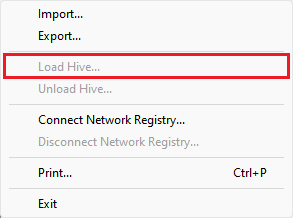
One of the core invariants of the Windows registry is that hives may only be mounted within the master hive (CmpMasterHive). This is enforced by CmpDoParseKey when trying to link the new hive into the global tree, and it means that hives cannot be loaded relative to other hives. If we look at the list of the top-level HKEY keys, the only two that represent the master hive are HKEY_LOCAL_MACHINE and HKEY_USERS. And indeed, the 'File > Load Hive...' option in Regedit is only enabled when the focus is on one of the two keys, otherwise it is grayed out:
As mentioned earlier, the current convention is that all hives in the system are typically mounted on the third level of the global registry tree, i.e. below one of \Registry{A,MACHINE,USER,WC}. However, there is nothing preventing a privileged program from loading a hive directly under the \Registry root, too.
Flags
In standard hive loading, there are almost no restrictions on the flags that can be used. The only requirement is that if the REG_FLUSH_HIVE_FILE_GROWTH flag is set, then both REG_HIVE_SINGLE_LOG and REG_BOOT_HIVE must be set, too.
Unloading
Normal hives stay loaded until they are manually unloaded or the system is shut down. The former can be achieved with the RegUnLoadKey API, or one of the underlying system calls: NtUnloadKey (since Windows NT 3.1), NtUnloadKeyEx (since Windows XP), or NtUnloadKey2 (since Windows Server 2003). Their prototypes are shown below:
NTSTATUS NtUnloadKey(
POBJECT_ATTRIBUTES TargetKey
);
NTSTATUS NtUnloadKeyEx(
POBJECT_ATTRIBUTES TargetKey,
HANDLE Event
);
NTSTATUS NtUnloadKey2(
POBJECT_ATTRIBUTES TargetKey,
ULONG Flags
);
The first syscall simply takes the path of the target key, the second adds an event that will be signaled when the hive is actually unloaded (in case any references to it are still open and the system call returns STATUS_PENDING), and the third one makes it possible to pass a REG_FORCE_UNLOAD (0x1) flag to force the unload even if any handles are open. All of them require SeRestorePrivilege to call successfully, so a local attacker has no way of using them directly.
Application hive loading
Application hives are undoubtedly one of the most security-relevant aspects of the registry, as they allow normal users to load fully controlled binary hives in the system. They played a crucial role in my research, having been useful in demonstrating the practical exploitability of 15 vulnerabilities reported to Microsoft.
In technical terms, every hive that is loaded with the REG_APP_HIVE flag is an app hive, and they get special treatment from the kernel in several respects. Let's examine some of the apphive-specific behaviors in the sections below.
Privileges
Contrary to normal hives, loading application hives requires no specific privileges from the caller. The only precondition is that the client has access to at least one file that is encoded as a regf, and the kernel can also open the file with the security token of the process for reading, and potentially writing. This is a trivial prerequisite if the attacker starts with full control over a local user account in the system, but may be potentially more difficult in more constrained environments such as security sandboxes.
Another consideration specific to application hives are their security descriptors. The documentation of the RegLoadAppKey function states:
All keys inside the hive must have the same security descriptor, otherwise the function will fail. This security descriptor must grant the caller the access specified by the samDesired parameter or the function will fail. You cannot use the RegSetKeySecurity function on any key inside the hive.
This doesn't matter much from a security perspective, because if the caller is attempting to load the hive, they most likely already have write access to that file. So regardless of its contents, if the caller is determined to load the hive, they can just modify it accordingly (e.g. change the security descriptors). But it is interesting to note that the above statement is only partially correct: indeed, no new security descriptors can be added to an active app hive, either through a RegSetKeySecurity call or by creating a new key with a custom descriptor (e.g. with a RegCreateKeyEx call with a non-NULL lpSecurityAttributes parameter). However, it is not quite right that RegLoadAppKey will fail if there is more than one security descriptor: currently, there are no such restrictions enforced and app hives can be successfully loaded with any number of descriptors. Furthermore, only KEY_READ access is checked rather than the samDesired mask specified by the caller, and only against the root key instead of all keys in the hive (this ties to there potentially being more than one descriptor). This has been reported to Microsoft in Windows Kernel enforcement of registry app hive security is inconsistent with documentation, and has been acknowledged as a discrepancy between documentation and implementation, but it is unclear if/when any steps will be taken to address it.
Mount Points
Application hives are subject to even stricter requirements with regards to mount points than normal hives: not only do they have to be mounted in the master hive, but it has to be specifically under \Registry\A. This "A" key is unique in that it and its subkeys are explicitly protected from opening by name. The check takes place in CmpParseKey, and the specific routine responsible for verifying the path is CmpDoesParseEnterRegistryA. Some of these rigorous checks were added and/or refined in response to James's issues #865 and #870 discovered in 2016. This means that the only way to obtain a handle to a key within \Registry\A is through the RootHandle argument to NtLoadKeyEx / NtLoadKey3, which ensures maximum privacy for the application hives. Since the names of the mount points are not used for anything, the only important property is that they don't collide with each other. This is guaranteed by KernelBase.dll in the internal BuildRootKeyName function, which picks the mount point name by generating a random 128-bit number and formatting it as a GUID string.
Another interesting feature of app hives is their ability to be shared between processes. If multiple processes load the same hive without the REG_PROCESS_APPKEY flag, they'll all access the same underlying data. In practice, if an app hive is first loaded at \Registry\A\Test1, and another program tries to load the same hive at \Registry\A\Test2, the kernel will effectively reuse the existing "Test1" hive, providing the caller with a handle to it. Because the mount point is irrelevant to the client after loading, this approach is both safe and efficient.
Flags
In addition to the flag restrictions imposed on normal hives, application hives disallow REG_NO_LAZY_FLUSH (0x4), REG_START_JOURNAL (0x40) and REG_BOOT_HIVE (0x400), which means that REG_FLUSH_HIVE_FILE_GROWTH (0x1000) is also prohibited. This leaves 0xEBB0 as the supported set of flags.
It's also worth noting that even though it is allowed, REG_HIVE_NO_RM (0x100) doesn't do anything for app hives because KTM transactions are disabled for them anyway. Furthermore, there seems to be a minor bug where specifying both the REG_APP_HIVE (0x10) and REG_LOAD_HIVE_OPEN_HANDLE (0x800) flags will cause the hive to stay loaded indefinitely. This proved useful as an exploitation primitive in issue #2378, but in general it simply leads to a memory leak and locking the hive file until the next reboot.
Unloading
Application hives don't need to be manually unloaded with any of the NtUnloadKey* system calls, but instead they are automatically unloaded when all handles to the hive's keys are closed. Internally, this is achieved by checking if the reference count of the root key's KCB has dropped to a near-zero value, and scheduling the CmpLateUnloadHiveWorker function to perform the actual cleanup.
Differencing hive loading
Differencing hives are the third major category of hives and the most recent one, introduced in Windows 10 1607. They are similar to application hives in that they are invisible to the naked eye (you won't typically see them in Regedit), but they are also much more complex, both for loading and operating on. Let's see how they compare to the other types of hives we have discussed so far.
Privileges
I have to start by saying that it is impossible to load a differencing hive with any of the standard NtLoadKey-family syscalls. These special hives need to be overlaid on top of other hives, and must also be configured as either writethrough or not. Instead of adding yet another system call or extending an existing one to accommodate these settings, Microsoft decided to take a different approach. This explains why none of the REG_* flags listed above reference differencing hives in any way.
In order to support registry containerization, the vendor added a driver called "VRegDriver" that is built into the ntoskrnl.exe executable image. It consists of two main parts: an IOCTL interface accessible at \Device\VRegDriver allowing communication with other system components, and a registry callback (VrpRegistryCallback) that implements the namespace redirection functionality. The generic IOCTL handler is VrpIoctlDeviceDispatch, and it supports nine different operations. One of them is 0x220008, handled by VrpHandleIoctlLoadDifferencingHive. This is the IOCTL used by the AppInfo service to load differencing hives on behalf of a starting Centennial application, and it does so by taking an undocumented structure on input, extracting the necessary information from it and calling directly into the internal CmLoadDifferencingKey routine to load the hive – the same one that NtLoadKey* use, too. (On a side note, there is a similar IOCTL 0x220020 handled by VrpHandleIoctlLoadDifferencingHiveForHost, but it's currently unclear how it's used or how it differs from 0x220008.)
Given all this, directly loading a differencing hive requires the ability to open the \Device\VRegDriver object (only accessible to administrators), as well as having the SeBackupPrivilege and SeRestorePrivilege rights (enforced by the IOCTL handler). Thus, it's clear that the option is not available to normal users. Alternatively, one can take advantage of the legitimate uses of the mechanism – bundle a malicious hive with a MSIX-packaged app or a Docker container that gets installed on the victim machine, and have it loaded as part of normal system operation. Naturally, this significantly limits the attack's practicality and also imposes further constraints on how the hive is loaded.
That said, loading custom differencing hives may not be necessarily required to exploit vulnerabilities related to layered keys. The \Registry\WC key is not locked down the same way as \Registry\A is, so it can be freely enumerated, and its subkeys can be opened and accessed according to their security descriptors. Furthermore, there are a number of default programs in Windows that make use of differencing hives, and in many cases an attacker can simply reuse one of them for their own purposes. For example, out of the 10 bugs I found that involved layered keys, only 2 of them required the ability to load custom differencing hives.
Mount Points
None of the kernel-mode components enforce any specific requirements with regards to the differencing hive mount points, other than them being located in the master hive (as for every other hive). This means that in theory, they could be loaded anywhere within \Registry or one of its four subkeys. In practice, all services using these hives for their intended purpose always load them under \Registry\WC.
Flags
Let's take a look at my reverse-engineered definition of the input structure expected by VrpHandleIoctlLoadDifferencingHive on Windows 11, which can be found in the CreateAndLoadDifferencingHive.cpp proof-of-concept exploit for issue #2479:
struct VRP_LOAD_DIFFERENCING_HIVE_INPUT {
/* +0x00 /HANDLE hJob;
/ +0x08 /DWORD Unused1;
/ +0x0c /DWORD DiffHiveFlags;
/ +0x10 /DWORD LoadFlags;
/ +0x14 /WORD MountPointLength;
/ +0x16 /WORD HivePathLength;
/ +0x18 /WORD BaseLayerPathLength;
/ +0x1a /WORD Unused2;
/ +0x1c /DWORD Unused3;
/ +0x20 /HANDLE hToken;
/ +0x28 */WCHAR Buffer[1];
};
Here at offset 0x10, LoadFlags represents the same information that is normally passed via the Flags argument to NtLoadKey* system calls. The set of legal flags for differencing hives is very narrow and consists of only three of them: REG_HIVE_NO_RM (0x100), REG_OPEN_READ_ONLY (0x2000) and REG_IMMUTABLE (0x4000).
Moreover, there is also an extra DiffHiveFlags member at offset 0xc that specifies the flags specific to differencing hives. So far, I have observed three supported flags and deduced their meaning to be as follows:
#define DIFF_HIVE_ADD_TO_TRUST_CLASS 1
#define DIFF_HIVE_WRITETHROUGH 2
#define DIFF_HIVE_TRUSTED 4`
第一个和第三个标志与信任类和符号链接的遵循有关,而第二个标志定义hive是否为writethrough,这是一种特殊类型的差异hive,将其键上的所有写操作重定向到较低层。如果DIFF_HIVE_WRITETHROUGH在DiffHiveFlags中设置,则REG_IMMUTABLE必须在LoadFlags中设置。
卸载
根据我的实验,差异hive通常在相应的silo被销毁时卸载:要么由系统服务调用0x220018 IOCTL(VrpHandleIoctlUnloadDynamicallyLoadedHives)拆除容器,要么在清理相应的作业对象时自动卸载,最终进入内部VrpUnloadDifferencingHive例程。最终,两个函数都调用ZwUnloadKey*(NtUnloadKey*的内核模式包装器),遵循标准的hive卸载过程。
结论
在这篇文章中,我试图阐明注册表树的结构,包括高级(WinAPI)和低级(内部系统库和内核)层面。如所示,这两个视图之间的关系是复杂的,并包含许多意想不到的怪癖。同时,熟悉这种设计对于理解一些更高级的注册表功能及其安全影响是非常宝贵的。我未能找到系统性地涵盖此主题的资源,因此希望这篇博客文章有所帮助。在本系列的下一部分中,我将解释hive的内部结构以及其中可能让你惊讶的许多事情。